JavaGuide Study Notes
JIT (Just in Time Compilation) and AOT (Ahead of Time Compilation)
| Dimension | JIT (Just-in-Time Compilation) | AOT (Ahead-of-Time Compilation) |
|---|---|---|
| Compilation timing | Runtime compilation | Pre-runtime compilation |
| Startup speed | Slower (requires warm-up) | Faster (no warm-up needed) |
| Peak performance | Higher (runtime optimizations) | Lower (lacks runtime info) |
| Memory usage | Higher | Lower |
| Package size | Smaller | Larger (includes machine code) |
| Dynamic feature support | Fully supported | Limited (reflection, dynamic proxies, etc.) |
| Use cases | Long-running services | Cloud-native, Serverless, CLI tools |
The main advantages of AOT lie in startup time and memory usage, while JIT provides higher peak performance and can reduce maximum request latency.
Due to its ahead-of-time nature, AOT cannot support technologies like Spring and ASM. When dynamic features are required, JIT compilation should be used.
It is a common misconception that primitive data types are always stored on the stack. Their storage location depends on their scope and declaration. If they are local variables, they are stored on the stack; if they are member variables, they are stored in the heap/method area/metaspace.
Why is there a risk of precision loss in floating-point operations?
Computers use binary representation, and numbers have limited precision. Infinite repeating decimals must be truncated when stored, leading to precision loss.
BigDecimal can perform precise floating-point calculations without precision loss. It is commonly used in scenarios requiring exact results (e.g., financial calculations).
Static Variables
Static variables are variables modified by the static keyword. They are shared across all instances of a class. No matter how many objects are created, they share the same static variable. Static variables are allocated only once, saving memory.
Object
/**
 * native method that returns the Class object of the current runtime object.
 * It is final and cannot be overridden.
 */
public final native Class<?> getClass()
/**
 * native method that returns the hash code of the object, mainly used in hash tables like HashMap.
 */
public native int hashCode()
/**
 * Compares whether two objects have the same memory address.
 * String overrides this method to compare values instead.
 */
public boolean equals(Object obj)
/**
 * native method that creates and returns a copy of the object.
 */
protected native Object clone() throws CloneNotSupportedException
/**
 * Returns a hexadecimal string of the object's hash code.
 * It is recommended to override this method.
 */
public String toString()
/**
 * native method that wakes up a single thread waiting on this object's monitor.
 */
public final native void notify()
/**
 * native method that wakes up all threads waiting on this object's monitor.
 */
public final native void notifyAll()
/**
 * native method that causes the current thread to wait.
 * Note: sleep does not release locks, but wait does.
 */
public final native void wait(long timeout) throws InterruptedException
/**
 * Additional nanoseconds parameter.
 */
public final void wait(long timeout, int nanos) throws InterruptedException
/**
 * Waits indefinitely.
 */
public final void wait() throws InterruptedException
/**
 * Called when the object is garbage collected.
 */
protected void finalize() throws Throwable { }
hashcode()
hashCode() is used to obtain the hash value, which determines the object’s position in a hash table.
When adding an object to a HashSet:
- First,
hashCode()is called to determine the bucket. - If the bucket is empty, insert directly.
- Otherwise, compare elements:
- If hash values differ, skip.
- If equal, call
equals():- If true → duplicate, do not insert.
- If false → insert into the bucket (linked list or tree).
Why must hashCode() be overridden when equals() is overridden?
If two objects are equal according to equals(), they must have the same hashCode(). Otherwise, collections like HashSet may behave incorrectly.
String
StringBuffer vs StringBuilder
Modifying a String creates a new object. StringBuffer and StringBuilder modify the same object instead.
Both extend AbstractStringBuilder:
- StringBuffer: thread-safe (synchronized methods), slower
- StringBuilder: not thread-safe, faster in single-threaded scenarios
String Constant Pool
// 1. Check if "ab" exists in the string constant pool; if not, create it
// 2. Assign reference to aa
String aa = "ab";
// Directly return the reference from the pool
String bb = "ab";
System.out.println(aa==bb); // true
Throwable
The parent class of all exceptions in Java is java.lang.Throwable, which has two important subclasses:
- Exception: Exceptions that the program itself can handle. Divided into Checked Exceptions (must be handled) and Unchecked Exceptions (not required to be handled).
- Error: Errors that the program itself cannot handle, e.g.,
VirtualMachineError,OutOfMemoryError,NoClassDefFoundError, etc.
Except for RuntimeException and its subclasses, all other Exception classes and their subclasses are checked exceptions. Common checked exceptions: IO‑related exceptions, ClassNotFoundException, SQLException.
Unchecked Exception – the code can compile successfully even if we do not handle them. RuntimeException and its subclasses are all unchecked exceptions. Common examples:
NullPointerExceptionIllegalArgumentException(e.g., wrong parameter type)NumberFormatException(subclass ofIllegalArgumentException, thrown when string‑to‑number conversion fails)ArrayIndexOutOfBoundsExceptionClassCastExceptionArithmeticExceptionSecurityException(e.g., insufficient permissions)UnsupportedOperationException(e.g., duplicate user creation)
try-with-resources
// The resource must implement java.lang.AutoCloseable or java.io.Closeable.
// Multiple resources are separated by semicolons.
try (Scanner scanner = new Scanner(new File("test.txt"))) {
    // use resource
} catch (Exception e) {
    // handle exception
}
| Feature | Traditional try-catch-finally | try-with-resources |
|---|---|---|
| Code volume | Verbose | Concise |
| Resource closing | Manual, easy to miss | Automatic, compile‑time guarantee |
| Exception handling | Closing exception may mask primary exception | Closing exceptions are suppressed, primary exception preserved |
| Readability | Poor (closing logic scattered) | High (resource management centralized) |
What should you pay attention to when using exceptions?
- Do not define exceptions as static variables – this can corrupt the exception stack trace. Each time you manually throw an exception, you should
newa new exception object. - Exception messages must be meaningful.
- Throw more specific exceptions – for example, when a string cannot be converted to a number, throw
NumberFormatExceptioninstead of its parentIllegalArgumentException. - Avoid duplicate logging – if the exception, error message, and stack trace are already logged at the catch site, do not log the same information again when re‑throwing. Duplicate logs bloat log files and may hide the real cause, making debugging harder.
Collections
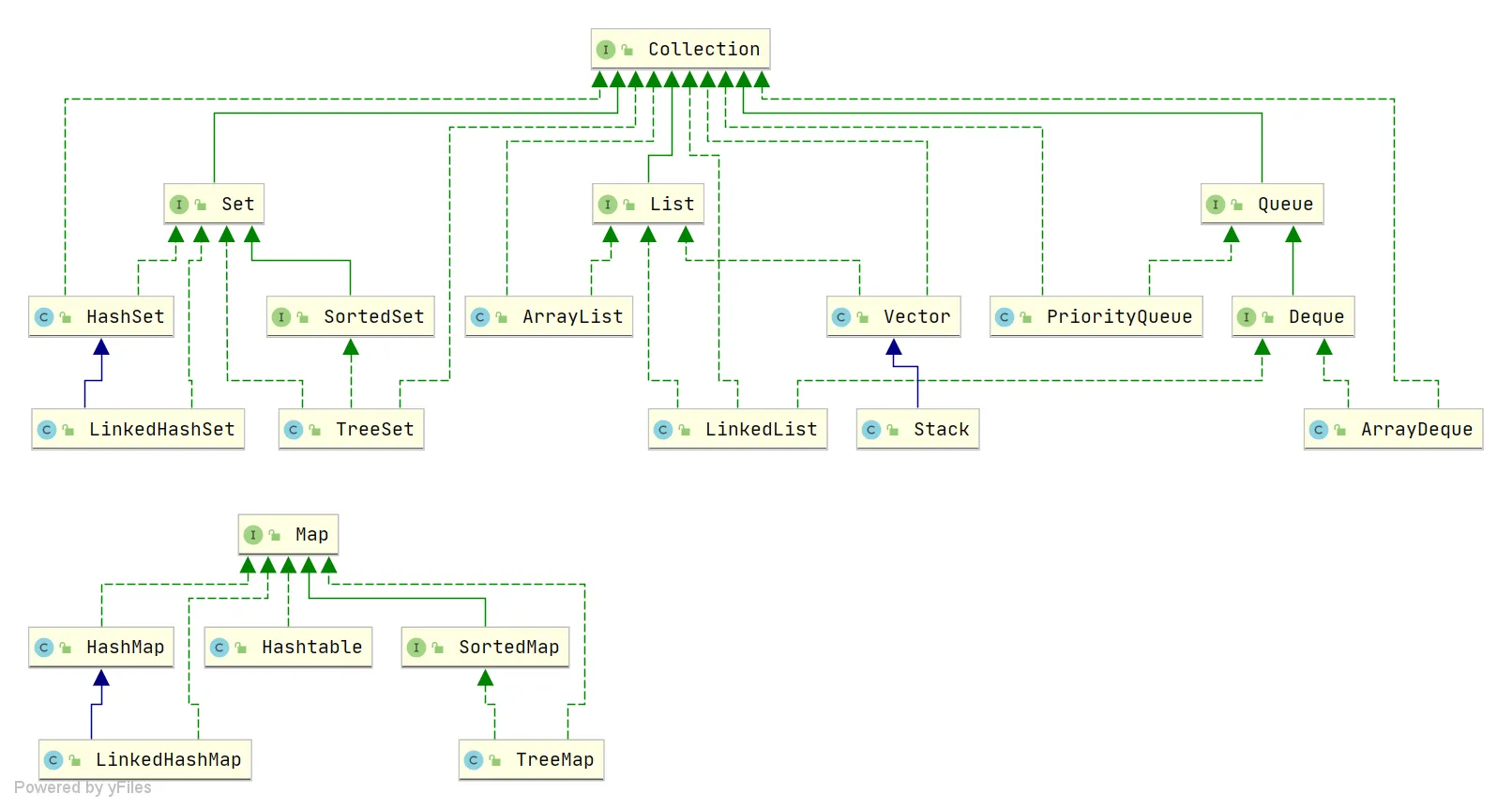
List, Set, Queue, Map
- List: ordered, allows duplicates.
- Set: does not allow duplicates.
- Queue: ordered, allows duplicates, with specific queuing rules determining order.
- Map: stores key‑value pairs; keys are unordered and unique, values are unordered and may have duplicates.
List
ArrayList:Object[]arrayVector:Object[]arrayLinkedList: doubly linked list
Set
HashSet: backed byHashMap, unordered and unique.LinkedHashSet: subclass ofHashSet, internally usesLinkedHashMap.TreeSet: red‑black tree, ordered and unique.
Queue
PriorityQueue: priority queue.DelayQueue: delayed queue.ArrayDeque: resizable dynamic double‑ended array.
Map
HashMap: array + linked list; when list length exceeds threshold (default 8), linked list converts to red‑black tree.LinkedHashMap: extendsHashMap, adds a doubly linked list to maintain insertion order.Hashtable: array + linked list.TreeMap: red‑black tree.
List
Differences between ArrayList and arrays
ArrayListdynamically grows and shrinks; arrays have fixed size after creation.ArrayListsupports generics for type safety; arrays do not.ArrayListcan only store objects (use wrapper classes for primitives); arrays can store primitive types directly.ArrayListsupports insertion, deletion, traversal, etc.; arrays only support index‑based access.ArrayListdoes not require size specification at creation; arrays do.
Time complexity of insertion and deletion in ArrayList
Insertion:
- Head insertion: O(n) because all elements must be shifted one position to the right.
- Tail insertion: O(1) when capacity is not exceeded (just add at the end). When capacity is exceeded and resizing is needed, copying the array is O(n), followed by O(1) insertion.
- Insert at specified position: O(n) because elements after the target position must be shifted right.
Deletion:
- Head deletion: O(n) because all elements must be shifted left.
- Tail deletion: O(1) when deleting the last element.
- Delete at specified position: O(n) because elements after the target must be shifted left.
Time complexity of insertion and deletion in LinkedList
- Insert/delete at head or tail: O(1) – only pointer modifications.
- Insert/delete at specified position: need to traverse to that position. With head/tail pointers, the traversal starts from the nearer end, so on average O(n/4) = O(n).